Looking for a 7" Android Honeycomb tablet? As of this writing, the Acer
Iconia Tab A100 is your only choice. The HTC Flyer/HTC
EVO View 4g runs OS 2.3 Gingerbread, last year's 7"
Samsung Galaxy Tab likewise is running 2.x , the 7" Lenovo A1 runs
Gingerbread and it looks like the upcoming 7" Viewsonic will run
Gingerbread as well. At the moment, it looks like the upcoming Samsung
Galaxy Tab 7.7 will be the only Honeycomb 3.2 competition (likely at a
higher price). In the absence of competition, the Acer A100 certainly
becomes much more appealing, but even if there were competition, this 7"
powerhouse tablet can hold its own. The Acer Iconia A100 packs all the
features of 10" Android Honeycomb tablets into a smaller, much more
portable package that can fit in a large pocket or purse. It has the
same 1GHz dual core Nvidia Tegra 2 CPU, a gig of RAM, 8 or 16 gigs of
storage, HDMI, WiFi 802.11b/g/n, Bluetooth and a GPS with compass. At
just $329 for the 8 gig model and $349 for the 16 gig model (both
expandable via microSD cards), the little Iconia seems like a bargain.
The tablet ships with Android OS 3.2 Honeycomb; the latest version of
the tablet OS that has support for 7" tablets and running Android OS 2.x
apps in stretched screen mode.
Display

Display
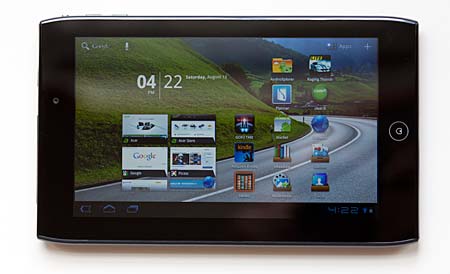
The A100 has a 1024 x 600 capacitive
multi-touch display--that's the same resolution as better quality 7"
tablets like the HTC Flyer and Galaxy Tab, and higher than most
ultra-budget tablets that sell for $200 or less. The display is bright,
extremely sharp and it has very high contrast. It looks absolutely great
head-on, but viewing angles are oddly narrow when viewing from the
bottom in landscape mode. Hold the tablet in front of you to watch a
video and it looks great. Lay the tablet flat on a table and the video
becomes unwatchable. If you hate narrow viewing angles, the tablet might
drive you crazy. But there are workarounds: side viewing angles are
wide, so those aren't much of an issue. If you wish to lay the tablet
flat on a table while viewing content in landscape mode, simply rotate
it upside down (with the home button to the left), and the viewing angle
will be sufficient. If you hold it directly in front of you with no
angle of rotation, the upside down view isn't as bright as the
rightside-up view. Got that? Since this isn't an IPS display and it is
glossy like all tablets, it's viewable outdoors but the display is
harder to see.
Design and Ergonomics
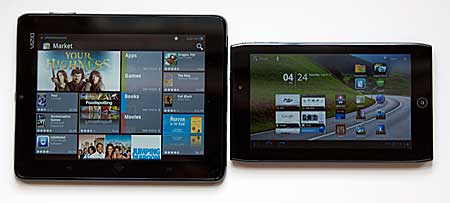
The Acer Iconia A100 is more rectangular than most 7" tablets. If you
have smaller hands, you'll find it easier to hold in portrait mode when
reading a book, and widescreen movie watching is perfect with little or
no letterboxing on this 16:9 aspect ratio display. The tablet weighs
0.92 lbs., similar to the 7" Galaxy Tab and BlackBerry PlayBook. When
using it as an ebook reader, my arms didn't tire as they do with 10"
tablets, and the tablet worked well with Aldiko, Barnes & Noble Nook
but not the Amazon Kindle app. It seems we'll need an updated version
of Kindle that works with 1024 x 600 Honeycomb 3.2 tablets. In the
meantime, older versions of Kindle (2.05 is the latest of older versions
floating around the Net) work on the Iconia A100.
Wireless
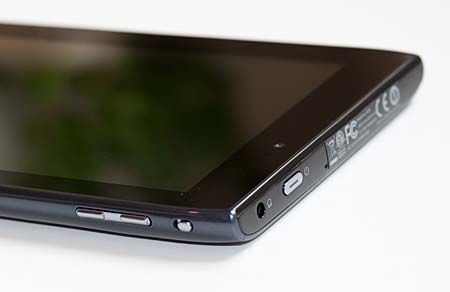
The A100 doesn't have 3G, though there is a covered
slot where a SIM card carrier could've been installed (it's next to the
microSD card slot). If Acer ships a 3G version, it will have the model
number A101, just as the A500 with 3G is the A501. The tablet ships with
WiFi 802.11b/g/n single band, and it has average range for a tablet.
That means it doesn't have the range of full sized notebooks, but it
does maintain a good signal up to 35 feet when using Apple's AirPort
Extreme wireless router and 40 feet with the D-Link DIR-655 (both with
walls between the tablet and router). Beyond 55 feet (with walls in
between) the signal becomes too unstable to rely on.
The Acer also has Bluetooth 2.1 +EDR and
a GPS with digital compass. In our tests using Google Maps and Google
Navigation, the A100 got a fix quickly indoors and maintained that fix
when driving (we used an HTC
Sensation 4G as a mobile hotspot so the Iconia could continually
download fresh map data on the road).
Software and Multimedia
Acer customizes the launcher with groups
that are basically icons that lead to custom folders for social
networking, multimedia, reading and gaming. These are actually a very
handy way to organize apps (I have 55 apps on my tablet and it's not fun
wading through them to find what I want), and you can add and remove
apps from these groups. There's also Acer's SocialJogger for Facebook
and Twitter social networking, Clear.fi, nemoPlayer (an attractive music
player, photo viewer and video player), Auopeo!, Movie Studio, MusicA,
Zinio and Google Books. This is much the same software as bundled with
the A500 tablet.
The tablet comes with the standard suite
of Google apps including the Webkit web browser, email, gmail, the
Android Market, YouTube player, Gtalk with video chat, Google Books,
Google Maps and Navigation, a calculator, PIM apps, a clock, camera and
camcorder apps and Gallery.
The tablet has a 2 megapixel front video
chat camera that works decently with Gtalk and a rear 5 megapixel
autofocus camera with LED flash that takes sharp photos and 720p video.
For streaming content, the Acer Iconia
A100 supports Google Movie rentals (integrated into the Android Market),
streaming TV episodes from TV networks using Adobe Flash but not Hulu
(Hulu blocks mobile clients, though Hulu Plus is available for some
mobile devices). It also works with Amazon Instant Video and
Crackle.com (both use Adobe Flash). There's no Netflix, but we're
hopeful it will arrive at some point since we're seeing it on other
Tegra 2 Honeycomb tablets like the Lenovo IdeaPad K1 and Asus Eee Pad
Transformer.
Battery Life
The Acer Iconia Tab A100 has two 1530
mAh Lithium Ion batteries (the A500 also has a dual battery
configuration). 3,060 mAh is a bit lower than the 4,000 mAh battery used
in the 7" Samsung Galaxy Tab or 5,000+ found in 10" tablets. With WiFi
on, and display brightness set to 40% we found the tablet lasted 5.5
hours on a charge when playing casual games, browsing the web, playing a
few YouTube videos, checking email and using social networking apps.
That's about the same as the 7" Galaxy Tab, but shorter than the 4,000
mAh single core CPU HTC Flyer by almost 2 hours. We don't expect the
same battery life from a 7" dual core Tegra 2 tablet as we get from a
10" tablet since the 10" has room for a larger battery, but we'd like to
see closer to 7 hours from the Acer. The tablet charges very quickly,
as a consolation.
Conclusion
Granted, the Acer Iconia Tab A100
currently has no competition in the 7" Android Honeycomb tablet market,
but even if that weren't the case, we'd still recommend it. In fact, I
bought one for myself. With a starting price of $329, this little tablet
is extremely portable and it packs the power of a 10" Honeycomb tablet.
It's very fast, has a bright and sharp display (albeit with weird
viewing angles), is stable and it runs the latest version of Honeycomb.
It handles Adobe Flash well, plays MPEG4 video like a champ, has a GPS
and all the trimmings you'd expect from a tier 1 tablet. The battery
life could be better though, and the viewing angles will be an issue for
some folks.


No comments:
Post a Comment